
Update: I am no longer allowing hotlinking of images from my site. You will have to host the RSS icon images yourself and change the URLs in the code to reflect their location on your own server.
I am sure you know that every blog on Blogger has an RSS feed, that contains all of your recent posts, and your visitors can use that feed to subscribe to your blog, in an RSS reader. But did you know that Blogger also provides RSS feeds for each and every label that you use to tag your posts? This can be handy for your visitors to subscribe only to the content they are interested in, without being bothered by the things they aren’t.
Why would you want to provide this for your visitors?
For example, if you have a multi-author blog and tag every post with the author’s name, your visitors can subscribe to just their favorite authors, without being bothered by posts from authors they don’t particularly like.
Or if you have a recipe blog, they can subscribe only to the types of recipes they are interested in. Let’s say you have recipes tagged with the labels slow cooker, Instant Pot, low carb, low fat, vegetarian, vegan, etc. if some people are interested only in slow cooker recipes, they can subscribe only to those, without being bothered with Instant Pot recipes, and vegans can subscribe only to vegan recipes, diabetics can subscribe only to low carb recipes, etc.
So how do you get these RSS links?
The problem is that Blogger doesn’t make this easy to show on your blog. There is no setting in the default Labels widget to display these additional RSS feed links with icons. But I am going to show you how you can do that, and make it match the color scheme of your site, at the same time.
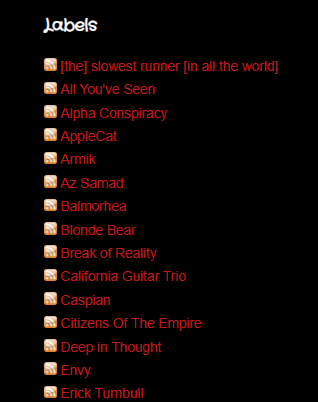
We are going to take a list of labels that looks like this…

And make it look like this…

Credits
Before we get started, I’d like to give credit to Bittbox, for providing the awesome RSS icons for this project. If you follow the instructions given on this page, those wonderful icons will appear on your blog, served up from my website, and you should link back to this page on Bittbox, in your credit links widget. (create a Link List widget and name it Credits)
Something like this would be perfect:

Now, let’s get started!
First, log into your Blogger account, and select your blog.
Go to Layout and remove any existing Labels widgets that you may already have. Then click the orange Save Arrangement button at the top of the page. (We are doing this to ensure that the Labels widget you will be working on, will have all defaults in place)
Now, add a new Labels widget, and don’t change the name or any of the other settings. (you can do that later, when we are done)
The settings should look like this:

Click the orange Save Arrangement button at the top of the Layout page.
Now, click the Theme link on the sidebar.
Click the Backup/Restore button on the upper right of the page.
Click the orange Download theme button.
Save the file to your hard drive, noting the location where you saved it, so you can find it later.
Locate the file you just downloaded, in Explorer or whatever file manager that you use.
Make a .zip archive or compressed folder containing that .xml file that you just downloaded.
You should now have 2 files: the .xml file that you just downloaded and a .zip file with a copy of that .xml file inside. That .zip file is your backup, which can be used to restore your site, in case anything goes wrong. Keep that .zip file safe and don’t make any changes to it.
Open the .xml file in a text editor.
Using the “Find” function of your text editor, search for Label1.
What you find, should look something like this:

Note that the code above begins with <b:widget id=’Label1′ locked=’false’ title=’Labels’ type=’Label’>
And ends with </b:widget> That’s the full code for your Labels widget.
Select those 2 lines and ALL of the lines of code that is between them, and replace it all with the following new widget code:
There are 2 URLs in the above code that you MUST change for this to work. Look for the URLs that contain the word “example” on lines 22 and 37, and change that word to the name of your blog, so that it will point to your blog URL. Do not change any other part of those URLs.
If you are happy with having orange RSS icons, skip ahead to the arrow ( ➡ ) below. If you’d like a different color, continue with the next step.
To change the color of the RSS icons, locate the icon file name in the 2 URLs of the above code, on lines 22 and 37. (default: rss_icon_glass12.PNG)
Replace BOTH instances of that file name with one of the following, that matches your desired RSS icon color:
 (orange) (orange) |
rss_icon_glass12.PNG |
 (black) (black) |
rss_icon_glass_black12.PNG |
 (blue) (blue) |
rss_icon_glass_blue12.PNG |
 (brown) (brown) |
rss_icon_glass_brown12.PNG |
 (gray) (gray) |
rss_icon_glass_gray12.PNG |
 (red) (red) |
rss_icon_glass_red12.PNG |
 (purple) (purple) |
rss_icon_glass_purple12.PNG |
 (green) (green) |
rss_icon_glass_green12.PNG |
➡ Save all changes to your .xml file.
Go back to the Backup/Restore window in Blogger.
Click the Choose file button, select your edited .xml file, then click the orange Upload button.
When it is finished uploading, go back to your Layout page and make any changes to your Labels widget options that you wish (name, order, show numbers, etc.).
Click the Save arrangement button when you are finished.
You are done!
Go take a look at your blog.
If everything went right, you should now have an RSS icon link, before each label name in your list. When you click that icon, it should take you to the RSS feed, displaying only your posts that are tagged with that label. Remember that this is an RSS feed, meant to be used with RSS readers, and won’t look at all like your site template. In some browsers, you may even see a whole bunch of XML code.
If things did not go right, especially if your site seems broken or elements are missing, unzip your original .xml template, go back to the Backup/Restore window in Blogger, and upload your original .xml template to restore your blog.




